

Flutter 3.38.0: How an accessibility upgrade broke Android headings
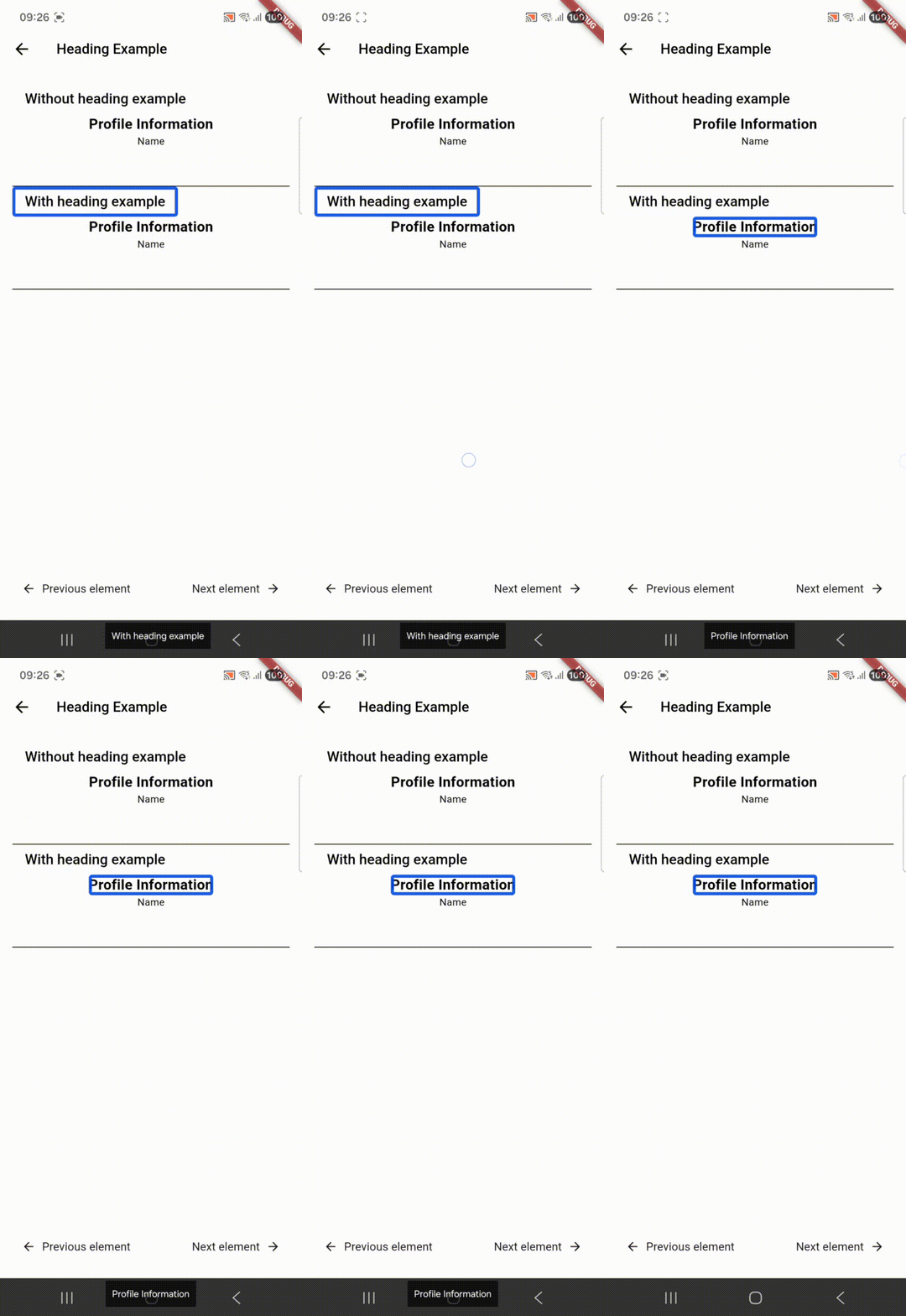
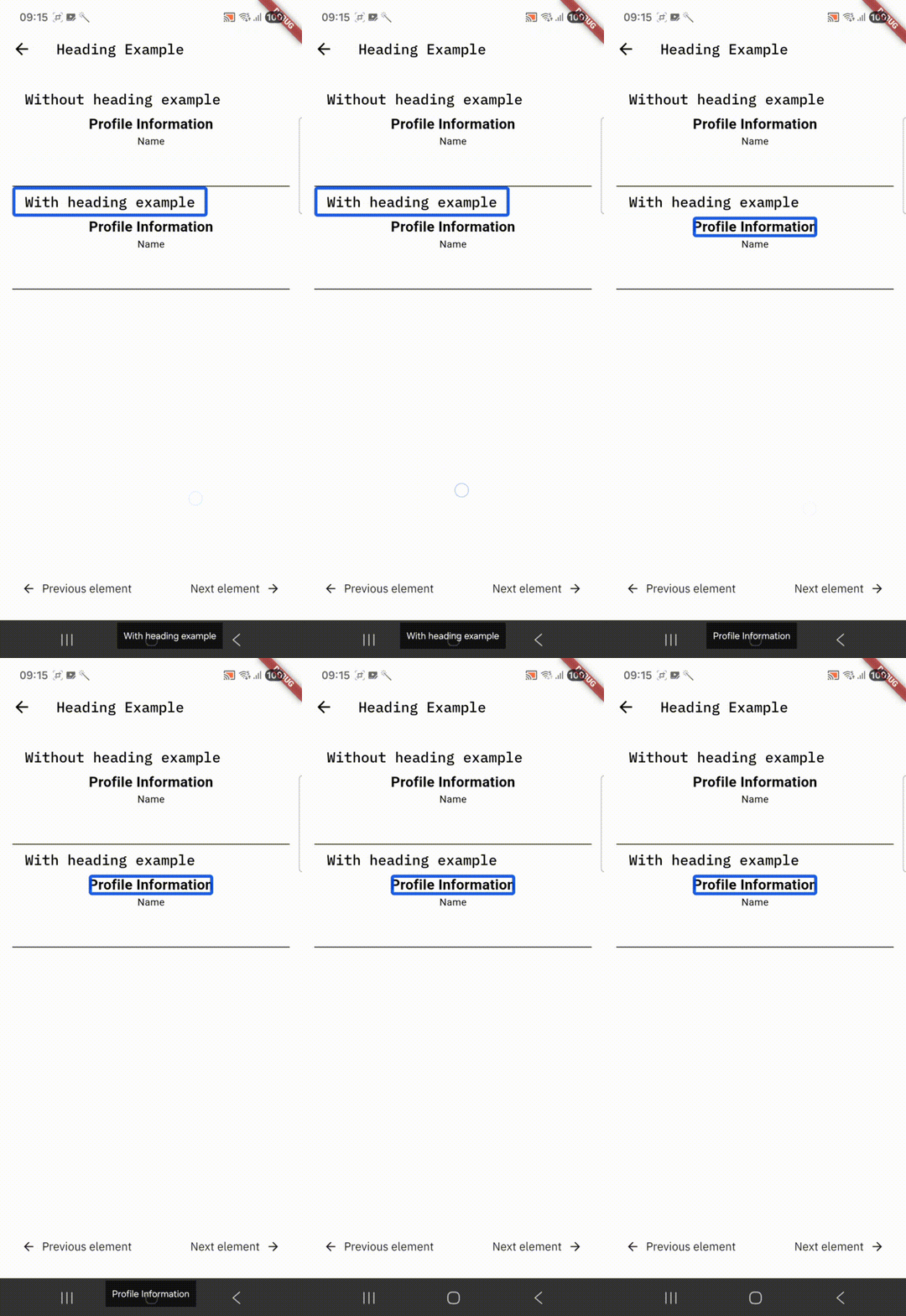
During a recent re-audit of one of our client's Flutter applications, we discovered something alarming. Headings were no longer being announced as headings by TalkBack on Android.
The client confirmed they had not changed any code related to headings. They showed us their implementation, headings were clearly set in their Flutter code. Also, headings were still announced by VoiceOver on iOS. Same codebase, different behavior.
Flutter 3.38.0 (broken) | Flutter 3.35.0 (working) |
|---|---|
|
|
"Profile Information" | "Profile Information, Heading" |
The investigation
Flutter uses an AccessibilityBridge to communicate its semantics to the platform the application is running on. We traced the issue to Pull Request #175416. This PR introduced a new headingLevel property to the Android accessibility bridge.
Here's what changed in AccessibilityBridge.java:
Before:
result.setHeading(semanticsNode.hasFlag(Flag.IS_HEADER));After:
result.setHeading(semanticsNode.headingLevel > 0);The change removed support for the existing Flag.IS_HEADER, without backwards compatibility. This breaking change shipped in Flutter version 3.38.0 on 11 November 2025. It silently broke heading semantics on Android for any app that did not migrate to the new property.
Here's where it gets interesting: Android doesn't actually support heading levels. As of Android 16 (the newest version at the time of writing), the platform only recognizes whether something is a heading or not. There are no heading levels like h1, h2, h3, etc.
The change was made with good intentions. It aligns Flutter's API with web and iOS, which do support heading levels. But the headingLevel property adds complexity to the Android codebase without any practical benefit for users.
The testing gap
Here's where things get particularly tricky: automated tests could give you false confidence.
If you wrote a Flutter test to verify that Flag.IS_HEADER was set on your semantics node, that test would still pass. The flag is being set in the Flutter framework. The problem is that the Android platform layer now ignores this flag completely.
This disconnect between Flutter's semantics tree and the actual platform accessibility tree is what makes this regression so insidious. You could have comprehensive test coverage and still ship broken accessibility to Android users.
The only way to catch this was through manual testing with TalkBack or using a native automation framework.
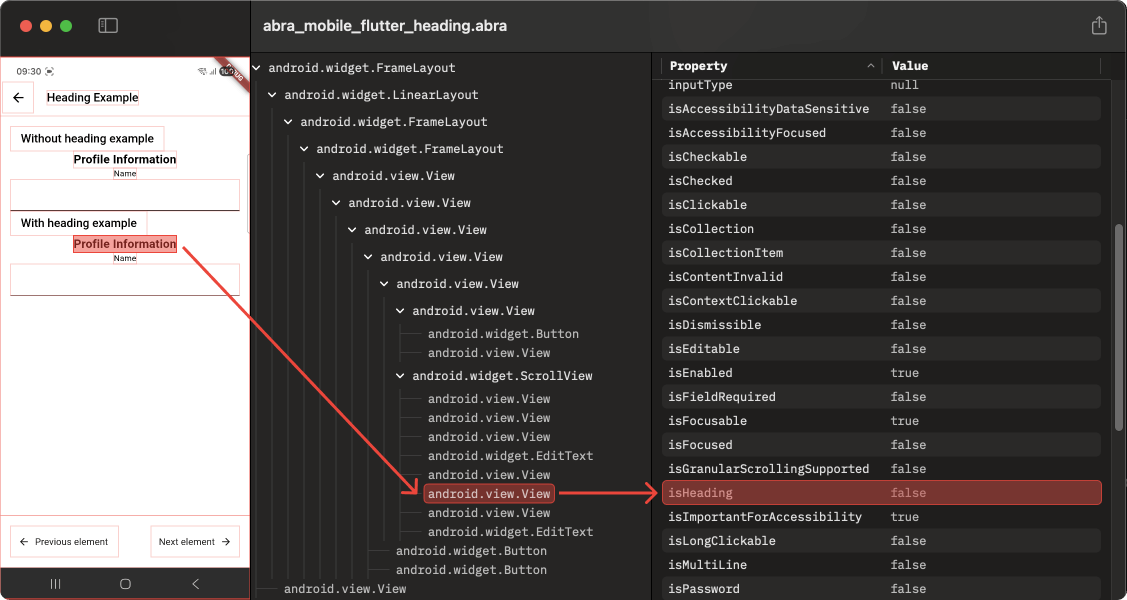 Using the accessibility snapshot feature of Abra Desktop, we confirmed that the
 isHeading property was not being set in the Android accessibility tree.
The fix
We submitted Pull Request #179681 to restore backward compatibility. The solution is straightforward. Check for both the legacy Flag.IS_HEADER and the new headingLevel property:
result.setHeading(semanticsNode.hasFlag(Flag.IS_HEADER) || semanticsNode.headingLevel > 0);This change ensures both properties can be used to indicate headings.
We also added test coverage that verifies the Flutter semantics flag actually sets the heading property in Android's accessibility tree. This prevents future regressions where the Flutter flag is set but ignored by the platform layer.
What Flutter developers should do
The action you need to take depends on your Flutter version:
Using Flutter < 3.38.0
Your heading semantics work correctly. However, be cautious when upgrading.
Using Flutter 3.38.0+
Your heading semantics are broken on Android. The only option is to add explicit headingLevel values (they can co-exist with Flag.IS_HEADER).
When adding heading levels, ensure you keep the hierarchy into account. Please don't add use the same heading level for every heading.
Given that Android doesn't actually have heading levels currently, a temporary fix is adding heading levels conditionally.
Semantics(
  header: true,
  headingLevel: Platform.isAndroid ? 1 : null,
  child: Text('Heading')
)
You can also wait until our fix accepted and shipped in a new Flutter version. This article will be updated to reflect the availability.
Lessons learned
This incident highlights critical lessons for cross-platform accessibility:
Breaking changes need backward compatibility – When modifying accessibility APIs, maintaining support for existing patterns is essential. Users with disabilities depend on these behaviors.
Platform parity matters – In cross-platform frameworks, inconsistent behavior between iOS and Android for the same code signals a serious problem.
Automated tests aren't enough – Unit tests can verify that Flutter's semantics flags are set. But they can't catch when the platform layer ignores those flags. Manual testing with assistive technology is irreplaceable.
Regular re-audits catch regressions – Accessibility isn't a one-time checkbox. Without our follow-up audit, this regression could have gone unnoticed much longer.
Worried about accessibility regressions in your apps? Abra helps you stay ahead with:
Testing services – Audits, consultancy and training to catch issues before your users do.
Testing products – Automated accessibility testing for Android, iOS, Flutter, React Native, etc.
Contact us to learn how we can help you maintain accessibility compliance across your mobile applications.
Further reading
-
Capture Android and iOS accessibility hierarchy using Abra snapshots
Browser DevTools make web accessibility inspection easy. Chrome, Firefox, and Safari all let you inspect the accessibility tree of any website. With mobile apps, we don't have that luxury. Read more »
-
Practical guide to mobile accessibility testing
If you are a developer, designer, tester, auditor or any other professional already working on accessibility but unsure how to approach mobile accessibility testing by hand, this guide is for you. Read more »
-
EAA compliance: how to write an Accessibility Statement for your app
The European Accessibility Act (EAA) is EU-wide legislation designed to make digital products and services accessible to everyone, including people with disabilities. If you provide digital products or services through a mobile app, you need processes and documentation that demonstrate how accessibility is managed and maintained. You can do this with an Accessibility Statement. Read more »